|
eLog# |
Module |
Title |
Description |
|
Defect 11428 |
Aircraft Inventory – Create JCN Task |
Functionality – Create JCN Task from Aircraft Inventory |
The previously introduced functionality to select and assign multiple Aircraft Inventory Maintenance Items (Time Controlled Components, Inspections, Checks, Service Suffixes, and SB/Ads) to a Job Control Number. |
|
Defect 11436 |
Aircraft Inventory – Scheduled Due List |
Scheduled Due List Report - month selection |
It was reported that the Scheduled Due List selection field on Months only accepts maximum '99' Months, where Hours and Landings accept '999999' hours/landings. With '99' months, we have a forecast period of 8 years and 3 months. Some Maintenance Items have calendar periods of 10, 15 or even 25 years. These inspections will not be captured on the report. This is now changed and the Report allows a max. of 999 Months. |
|
Defect 11444 |
Aircraft Inventory – Add Suffix |
During Add Suffix, Last Done Data is not correctly collected |
It was reported that the Last Done Details are not correctly set when a new Service Suffix is added to an existing Component. This is now corrected and the Last Done Data (Aircraft Hours Installed, Aircraft Landings Installed and Installation Date) from the Component it's associated with. |
|
Defect 11460 |
Aircraft Inventory – Create JCN Task |
Incorrect display of selected Part Serial Number on 'Create JCN Transaction' |
It was reported that the Part Serial Numbers are NOT displayed correctly upon the “Create JCN Task” functionality. All entries were showing the Aircraft Serial Number. This is now corrected. NOTE: The JCN Transactions were already correctly generated with the correct Part Serial Numbers. |
|
Defect 10624 |
Aircraft Inventory – Create JCN Task |
Chapter 05 Phased Inspection Skelton not transferred to JCN |
When a Phased Inspection/Chapter 05 Inspection is selected from A/C Inventory and Transferred to a JCN with "Options - Create JCN Task" ONLY the Chapter 05 Task is transferred to the JCN. The associated JCN Skeleton Tasks of the Phased Inspection/Chapter 05 Inspection/Skeleton are NOT transferred to the JCN. This is now corrected and the JCN Skelton Tasks of the associated Skeleton is selected in Aircraft Inventory and transferred to a JCN via the “Options – Add JCN Task”. |
|
Defect 11414 |
Aircraft Inventory – Generic Type Codes |
User with View rights Only can Add/Change/Delete Generic Type Codes |
It
was discovered that a user with View Rights only can Add/Change/Delete
Generic Type Codes via the Pop-up window. |
|
Feature 268 |
Aircraft Inventory |
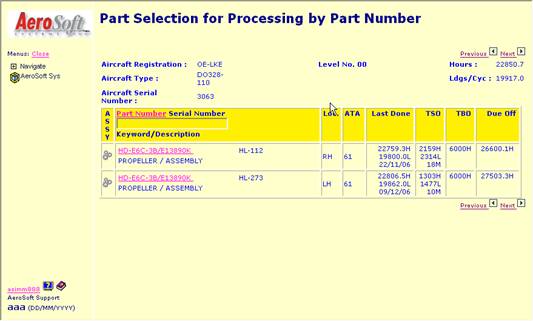
Include Total Aircraft Times (Hours & Cycles) and Last Update Date in Aircraft Overview |
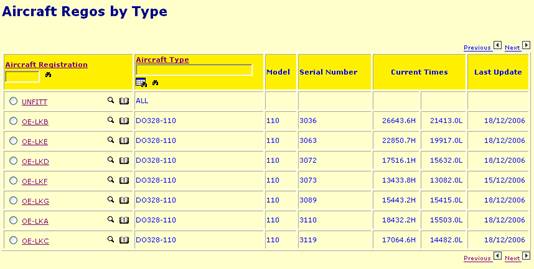
It was requested to include the Total Aircraft Times (Hours & Cycles) and Last Update Date in Aircraft Overview. This is now provided for.
|
|
Feature 257 |
Aircraft Inventory |
Include 'Flight Log Pop-up'-icon for Flight Times selection on various Aircraft Inventory templates |
It
was suggested to include the - add/change Components, - add/change Inspections, - add/change Suffixes, and - add/change SB/AD's. |
|
Feature 255 |
Aircraft Inventory |
Provide an additional identifier for 25H/L and 3 Days remaining on Aircraft Inventory |
It was requested to include an additional icon when the Time Remaining is less than 25 Hours/Cycles and/or 3 Days to Aircraft Inventory and Scheduled Due List. This
|
|
Feature 242 |
Aircraft Inventory |
Provide validation on Date and Findings - processing services |
It was requested to provide a quicker validation on entry field during the processing of services. This in now provided for. |
|
|
|
|
|
|
eLog# |
Module |
Title |
Description |
|
Defect 11443 |
Aircraft Discrepancies |
Discrepancy Text is removed upon selection/correction of the Issue Date. |
It was reported that the “Problem Description” is reset after the “Issue Date” is re-selected or corrected. This is now corrected. |
|
Defect 11467 |
Aircraft Discrepancies |
Search on Registration in Closed Discrepancies not working |
It was reported that the search of Registration in the Closed Discrepancies is not working properly. This is now corrected. |
|
Defect 10616 |
Aircraft Discrepancies |
'Discrepancies View' does not show the Requisition Number created from this Discrepancy. |
After creating a Requisition Number from 'Discrepancies Add' screen, users will expect to see the Requisition Number when they view this new-added Discrepancy. However, the 'Discrepancies View' program asimm380 does not show the Requisition Number created from this Discrepancy. This is now corrected. |
|
Defect 10711, 800 & 801. Feature 82 |
Aircraft Discrepancies |
Current behavior to add a Requisition to a Discrepancy is not useful. |
The current behavior to add a requisition to a discrepancy is not logical and is not useful for the customers. Following changes have been incorporated: a. Remove the question 'Create a Part Requisition (Y/N)?:' and set-up a 'Create Requisition'-button instead. b. Clicking the 'Create Requisition'-button will display Requisition Screen. c. Import standard-data from the Discrepancy into the Requisition (Aircraft, Requested by, JCN, Requisition Number). e. After adding the requisition, record the requisition number in 'Req#'. |
|
|
|
|
|
|
eLog# |
Module |
Title |
Description |
|
Defect 11452 |
Receipts – Stock Take |
Rolling Stock – next looses selected Base |
It
was reported that the selected base on (Rolling) Stock Take is ‘lost’ after
pressing the ‘next’ set of records. |
|
|
|
|
|
|
eLog# |
Module |
Title |
Description |
|
Defect 11427 |
Part Locator – Inspections/SBs |
Change “Materials to Part/Inspection/SBAD” not user-friendly |
It was reported that the display ‘Change Materials shows several input fields that are read-only. They appear to allow a change and are annoying because changes are not allowed. Only the field “Qty” will allow a change. This is now changed and except for “Qty” all other fields are non-accessible. |
|
Defect 11447 |
Part Locator – Inspections/SBs |
Delete of incorrect Aircraft Type Record not possible |
It was reported that an incorrect Aircraft Type Record of an Rotable, Inspection or Suffix Service can NOT be deleted. The system will check for the correctness of the Aircraft Type Code during a delete process. This is not required and has been corrected. |
|
Defect 11452 |
Part Locator – Stock Take |
Rolling Stock – next looses selected Base |
It
was reported that the selected base on (Rolling) Stock Take is ‘lost’ after
pressing the ‘next’ set of records. |
|
Defect 11453 |
Part Locator – Rotable Issue |
Rotable Issue to Aircraft ‘aborted’ but still JCN Transaction record |
It was reported that a JCN Transaction record was generated although the Rotable Issue process was not successfully conducted due to incorrect Issue Date. This is now corrected and a JCN Transaction is ONLY created upon a successful Issue. |
|
Defect 11480 |
Part Locator – SB/AD |
SB Overview does not return to ‘previous’ record |
It was reported that the SB Overview is not returning to the previous list/entry but jumps back to the Top of the list. This is now corrected. |
|
Defect 11413 |
Part Locator |
User with View rights Only can Add/Change/Delete Base Codes |
It was discovered that an user with View Rights only can Add/Change/Delete Base Codes via the Pop-up window. This is now corrected. |
|
Defect 11430 |
Part Locator - Requisition |
Adding requisition is requesting JCN which is filled in |
It was reported that the entered JCN on the Requisition was not accepted. This is now corrected. |
|
Defect 11434 |
Part Locator – SB/AD |
Changing a SB or AD with file change |
It was reported that a SB/AD change deletes the “Description” field and the ‘Save’ button is not shown. This is now corrected. |
|
Defect 11451 |
Part Locator - Inspection |
Inspection Change not completely performed |
It was reported that the Part Number Change program is not taking the Phased Inspection table into account. This is now corrected. |
|
Defect 11432 |
Part Locator – SB/AD |
Delete GPI SB/AD not working. |
It was reported that certain SB/AD records could not be deleted from the SB/AD List. This is now corrected. |
|
Feature 248 |
Part Locator – Requisitions |
Include entry of ATA Chapter of Requisition for new Parts |
It was requested to include the ATA Chapter when creating a Requisition for a New Part. This is now provided for.
|
|
Feature 247 |
Part Locator - Requisitions |
Provide user-friendly behavior on Requisitions |
It was suggested to provide user-friendly behavior to auto-provide the necessary/logic pop-ups and field validation. This is now provided for. |
|
Feature 246 |
Part Locator – SB/AD |
Include SB/AD Category "Highly Recommended" |
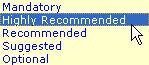
It was requested to have the SB/AD Category 'Highly Recommended' included, as this represents a Regulatory Requirement. The new code 'HIGH.RECOM' is treated the same as 'RECOMMEND'.
|
|
Feature 234 |
Part Locator – Material Issue |
Material Issue - Auto-pop up of JCN selection after Registration Pop-up selection |
After providing the functionality to display the JCN selection pop-up after a manual entry/change of the Registration, it was requested/suggested to bring up the JCN Selection pop-up automatically after the user has selected a Registration from the Registration Selection pop-up. |
|
Feature 212 |
Part Locator – Serviceable Tag |
Modify Serviceable Tag to align text-fields and add additional details |
AAA requested following changes to the current Serviceable Tag: - Align all text to the left (at the Keyword level), - Include the Unit of Measure behind the Qty, - Insert last name of receiver, - Insert date of receipt, and - Insert Manufacture Date and Overhaul Date. |
|
Feature 195 |
Part Locator - Requisitions |
Adding requisition which contains the aircraft reference |
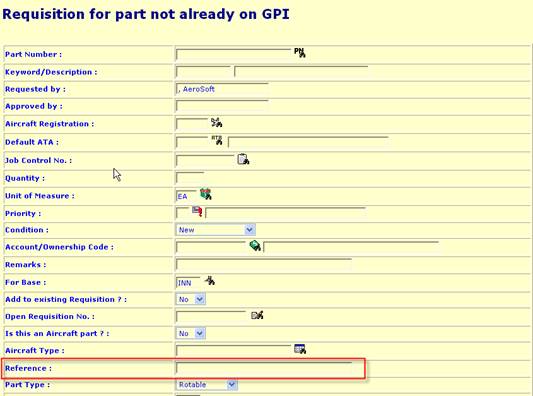
It would be handy for the person involved of checking the new parts for correct introduction that when a requisition has been made for a new part that besides the aircraft type that needs to be chosen also the reference can be filled in. This is now provided for.
|
|
|
|
|
|
|
eLog# |
Module |
Title |
Description |
|
Defect 11468 |
Purchasing – Orders |
Purchase Order prints an empty second page |
It was reported that the Purchase Order (im533) generates an empty second page. This was related to many empty rows from the Form Message. This is now corrected and empty Form Message rows are no longer printed. |
|
Defect 11470 |
Purchasing – Orders |
Pop-up Work order Type does not close correctly |
It was reported that the Work Order Type pop-up is not closed correctly after selecting the Work Order Type code for a new Purchase Order entry. This is now corrected and the Work Order Type Description is submitted to the Order Display as well. |
|
Defect 11426 |
Purchasing - Vendor |
Delete of House Record / Change of House Record |
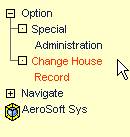
It was reported that under certain circumstances the House Record was changed. In order to prevent this from happening by un-authorized staff, access to the House Record is moved to the System Administrator section “Modify Control record”.
|
|
Feature 273 |
Purchase - Repairs |
Ability to create a RO for Parts still fitted on Aircraft |
It was requested to be able to generate a (pro-forma) Repair Order for Parts still fitted on the aircraft. This functionality is required to prepare and ship the RO to the designated Repair Shop before the actual unit is removed and shipped. Following functionalities are provided: - Fitted parts can be assigned to a RO, using create new repair and add to order, - Fitted parts (on RO) can NOT be received on the RO, and - Upon removal the parts will be placed on RO. |
|
Feature 269 |
Purchase – Sundry Orders |
Allow entry of SN on Sundry Order |
It was requested to allow the entry of a SN on a Sundry Order. Sundry Orders need to be used to send Tools on Repair (they can not be handled via a RO) and would require the entry of a SN. This requested is incorporated. |
|
Feature 265 |
Purchasing – Orders |
Display Vendor Address in Header during Order Creation process |
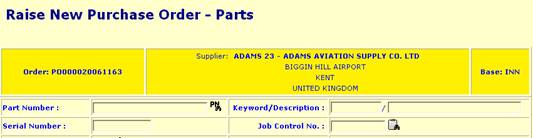
It was suggested to display the Vendor Address in the Header during the Order Creation Process. This is now provided for.
|
|
Feature 259 |
Purchasing - Vendors |
Provide additional Vendor Details in Vendor pop-up |
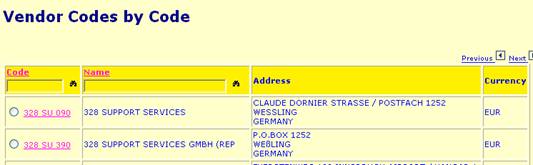
It was suggested to provide additional Vendor Details in the Vendor Pop-up to provide the user a better overview and allow him to select the correct vendor Code. Several Vendor Codes & Names looks to identical to make a proper selection. This is now provided for:
|
|
Feature 253 |
Purchasing - Vendor |
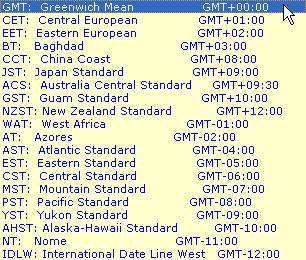
Provide dropdown list with Time Zones for Vendor Records |
It was suggested to provide a dropdown list on the Time Zone field to prevent entry of 'free text'. A list with the standard ISO Time Zone abbreviations has been provided for.
|
|
|
|
|
|
|
eLog# |
Module |
Title |
Description |
|
Defect 11415 |
Reports – Shelf Life |
Shelf Life Report can only display max. 9 months |
It was reported that the Shelf Life Report selection could only hold 1 digit. Therefore a maximum period of 9 months could be selected for the report. This is now corrected; the Shelf Life report selection can hold 2 digits –or- 99 months. |
|
Defect 11464 |
Reports – Inventory |
Part Inventory Report printed on 2 pages |
It was reported that the Part Inventory Report (asiim591) is printing one page on two pieces of paper. This was related to the empty rows in the header of the report/page. This is now corrected. |
|
|
|
|
|
|
eLog# |
Module |
Title |
Description |
|
Defect 10711, 800 & 801 |
Requisitions |
Current behavior to add a Requisition to a Discrepancy is not useful. |
The current behavior to add a requisition to a discrepancy is not logical and is not useful for the customers. Following changes have been incorporated: a. Remove the question 'Create a Part Requistion (Y/N)?:' and set-up a 'Create Requisition'-button instead. b. Clicking the 'Create Requisition'-button will display Requisition Screen. c. Import standard-data from the Discrepancy into the Requisition (Aircraft, Requested by, JCN, Requisition Number). e. After adding the requisition, record the requisition number in 'Req#'. |
|
|
|
|
|
|
eLog# |
Module |
Title |
Description |
|
Defect 11445 |
Flight Log |
Flight Log – Approach Category does not include an empty option |
It was reported that the Flight Log “Approach Category” does not allow the selection of an empty record. In certain events the “Approach Category” is not known and would require an empty selection. Better to provide ‘nothing’ than an incorrect Category. The selection has been changed to allow an empty entry. |
|
Defect 11476 |
Flight Log Report |
Flight Log Report generates error messages |
Running the Flight Log against ALL aircraft for the last day of flight logs generates a list of error messages on screen. The report however is printed correctly. This is now corrected and the error messages are no longer displayed. |
|
Defect 11416 |
Flight Log |
User with View rights Only can Add/Change/Delete Flight Logs |
It was Discovered that an user with View Rights only can Add/Change/Delete Flight Logs. This is now corrected. |
|
Defect 11417 |
Flight Log - Airports |
User with View rights Only can Add/Change/Delete Airports |
It
was Discovered that an user with View Rights only can Add/Change/Delete
Airports. |
|
Defect 11418 |
Flight Log – Flight Table |
User with View rights Only can Add/Change/Delete Flights |
It was Discovered that an user with View Rights only can Add/Change/Delete Flights (asifl890). This is now corrected. |
|
Defect 11419 |
Flight Log – Crew Duty Records |
User with View rights Only can Add/Change/Delete Crew Duty Records |
It was discovered that an user with View Rights only can Add/Change/Delete Crew Duty Records. This is now corrected. |
|
Defect 11420 |
Flight Log – Crew Codes |
User with View rights Only can Add/Change/Delete Crew Codes |
It was discovered that a user with View Rights only can Add/Change/Delete Crew Codes. This is now corrected. |
|
Feature 276 |
Flight Log Report |
Flight Log Report |
It was requested to provide an 'leave blank for ALL'-selection when printing the Flight Log Report. It would be faster if the user could leave the Field 'Aircraft Registration' blank and for each Aircraft, a report is printed. This modification has been incorporated and an additional bug on an additional empty page was fixed. |
|
|
|
|
|
|
eLog# |
Module |
Title |
Description |
|
Defect 11429 |
Job Control – JCN Task Card |
Template jc526 not in house style |
The
template on the JCN Task Card selection was not showing the correct ‘House
style’.
|
|
Defect 11440 |
Job Control – JCN Task Card |
JCN Task Card contains too many empty lines on top of report |
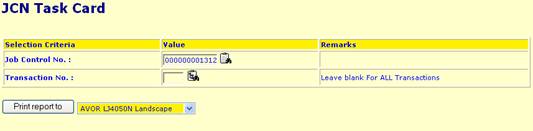
The JCN Task Card (version jc526) holds several empty rows at the top of each page. This resulted in a 2 page Task Card, where the complete Task Card could fit 1 page. This is now changed, unnecessary rows have been removed from the Report. |
|
Defect 11442 |
Job Control – Transaction Text |
JCN Transaction – Work Completed text not properly transferred |
It was reported that under certain circumstances the Work Completed Text on the JCN Transaction was not properly submitted from the Textarea (input box) to the individual lines. This is now corrected. |
|
Defect 11448 |
Job Control – JCN Task Card |
JCN Task Card holds too many ‘unused’ lines. |
It was noticed that the JCN Task Card (asijc526) holds too many lines when elements are not in use. This relates to the following sections: - Planning Information, and - Resources Usage Report. This is now corrected and the report will not contain the following sections, when these contain no data: - “Planning Information/Manpower”, - “Planning Information/Materials”, - “Planning Information/Tools”, - “Planning Information/Access Panels”, - “Resources Usage Report/Manpower”, - “Resources Usage Report/Consumables”, and - “Resources Usage Report/Rotables” |
|
Defect 11449 |
Job Control |
Return to Inventory will delete JCN Transaction |
It was reported that a Scheduled Removal JCN Transaction will be deleted when the Issued Rotable is ‘Returned to Inventory’ (asiim000). This is now corrected: The JCN Transaction Record shall NOT be deleted during ‘Return to Inventory’ when the “WORK-REQ-ACTION” is set to “REMOVE”. The process ‘Return to Inventory’ shall perform following JCN actions: - recalculate the JCN Total Cost, and - reset JCN Part On Details. |
|
Defect 11450 |
Job Control – Transaction Text |
JCN Transaction does not show Corrective Action in VIEW mode |
It was reported that the JCN Transaction is not displaying the corrective action in view mode. This is now corrected. |
|
Defect 11461 |
Job Control – JCN Task Card |
JCN Task Card contains incorrect Work Completed text |
It
was reported that under certain conditions the JCN Task Card (asijc526)
collects incorrect Work Completed data. |
|
Defect 11469 |
Job Control – Index Report |
JCN Index Report does not print 1st line of Generic Task |
It was reported that the JCN Index Report (asijc503) does NOT print the first line of the Work Requirements for a Skeleton Task Card. This is now corrected and following additional changes have been incorporated: - the names of “Insp.by” and “Proc’d by” are no longer printed below the signature line, - the Header “Insp. By” is changed into “Done by”, - the Header “Proc’d by” is changed into “Insp. By”, - all text lines of the JCN Transaction (Work Required / Work Completed) are printed, - the empty lines above the header are removed, and - the number of lines per page has been reduced to 55. |
|
Feature 270 |
Job Control |
Provide additional data on JCN Template |
It was requested to provide following details to the Job Control Transaction templates: - Aircraft Registration, - Aircraft Type Code, - Aircraft Serial Number, and - an Indicator to indicate if the effected Aircraft Registration is also listed in FMM03 (with same Aircraft Type and Aircraft Serial Number).
Additionally,
the pop-up window “Fitted Components” can be displayed with the
|
|
Feature 256 |
Job Control – JCN Task Card |
Include Transaction Pop-up Icon on print JCN Tasks |
We
have included the
|
|
|
|
|
|
|
|
|
|
|
|
eLog# |
Module |
Title |
Description |
|
Defect 11421 |
Library Management |
User with View rights Only can NOT view Library Records |
It was discovered that a user with View Rights only NOT view Library Records. This is now corrected. |
|
|
|
|
|
|
eLog# |
Module |
Title |
Description |
|
- |
Online Documentation |
Screen help & Reports |
Several screens of the ‘Screen Help’ and ‘Reports’ have been updated. |
|
Defect 11441 |
General |
Various issues with Templates |
We discovered and corrected various small bugs related to the layout and “cosmetics” of various screens. These have been corrected. |
|
Feature 245 |
General |
Provide a wider Pop-up window |
It was suggested to display a wider pop-up window to have proper display of certain tables that hold many columns This is provided for. |
 icon for Flight Log selection in
following screens:
icon for Flight Log selection in
following screens: icon is provided
for.
icon is provided
for.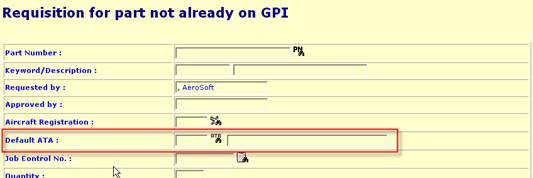
 Icon to select the required JCN
Transaction from the corresponding Pop-up Window.
Icon to select the required JCN
Transaction from the corresponding Pop-up Window. 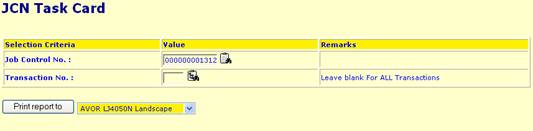
 icon on the Part OFF
details to select the correct Off Unit.
icon on the Part OFF
details to select the correct Off Unit.