|
DigiMAINT™ Update Package – April
30th, 2010 – Release 3.80 |
|||
|
eLog# |
Module |
Title |
Description |
|
Elog #12106 |
Aircraft Inventory |
Report “Times Report – Short” shows incorrect Total
Times for selected Period |
It was reported that there is a difference between
the Total Times for a selected Period when he print the “Times Report – Short”
and the “Times Report – Detailed” Reports. This is now corrected. |
|
Elog #10783 |
Aircraft Inventory |
Modifications to asimm625 template |
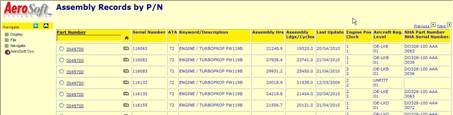
We have made modifications to the Assembly records
Overview and include details such as: -
Aircraft fitted to, -
Assembly Times, -
Last Update, and -
Next Higher Assembly details.
|
|
Elog #12146 |
Aircraft Inventory |
Inspection Limits assigned |
It was reported that if a Inspection Limit was
re-assigned to the default value after processing the Inspection although the
Inspection limit was previously removed. This is now corrected. |
|
Elog #12547 |
Aircraft Inventory |
Header on Maintenance Report incomplete |
It was reported that the
Due Maintenance Report would be incomplete if there was no data
applicable for the selected period. This is now corrected. |
|
Elog #12552 |
Aircraft Inventory |
Incorrect CALENDAR TYPE applied during Service
suffix transfer upon Component Installation |
It was reported that
under certain conditions during an Component Installation, the Calendar Type
“Months” was applied on a Service Suffix instead of the default “Days”. This is now corrected. |
|
Elog #12556 |
Aircraft Inventory |
During Component Change/Process Inspection, JCN
Aircraft Times are not collected |
We discovered that during
Component Change/Process Inspection, the previously assigned JCN Aircraft
Times are not collected and forwarded. This is now corrected. |
|
Elog #12559 |
Aircraft Inventory |
Remove “Usage Forecast Report” from Report Menu Options |
The un-used report “Usage
Forecast Report” was initially designed for a former customer. This report
was no longer supported and has therefore been removed. |
|
Elog #12560 |
Aircraft Inventory |
Registration not defaulted on Unscheduled Removals
Report |
It was reported that the
Unscheduled Removals Report would not hold the default Aircraft Registration
from which the Report was called. This is now corrected. |
|
Elog #12561 |
Aircraft Inventory |
Registration not defaulted on Serialization List
Report |
It was reported that the Serialization List Report
would not hold the default Aircraft Registration from which the Report was
called. This is now corrected. |
|
Elog #12566 |
Aircraft Inventory |
File Error upon Add Inspection to APU |
It was reported that an
error message would be shown after adding an Inspection to an APU. This is now corrected. |
|
Elog #12576 |
Aircraft Inventory |
Report “Times Report – Short” shows incorrect Total
Times for selected Period |
It was reported that the “Aircraft
Times report – Short” shows a different Total times for selected Period as
the “Statistics by Rego”. This is now corrected. |
|
Elog #12596 |
Aircraft Inventory |
Planning Due List on Assembly – No report header |
When the Planning Due
List is run on an Assembly, the report contains no header and footer details. This is now corrected. |
|
Elog #12605 |
Aircraft Inventory |
Remarks (reason for removal) of Rotable in stores
are transferred to Fitted Rotables |
When a Rotable is removed
from an Aircraft/Assembly, we store the “findings” in ROT-REMARKS. When this rotable is
re-installed on an Aircraft/Assembly, these remarks are moved to “Due List
Remarks” incorrectly. This is now corrected,
the installed Unit will not carry the previous remarks. |
|
Elog #12606 |
Aircraft Inventory |
Adjust Assembly Times not reflected in Flight Times
Table |
When we modify the
Clocked Assembly Times, we do NOT include a correction record in Aircraft
Times Table. This is now corrected. |
|
|
|
|
|
|
Elog #F455 |
Discrepancies |
Use Today as default End Date on Discrepancy Report
Selection |
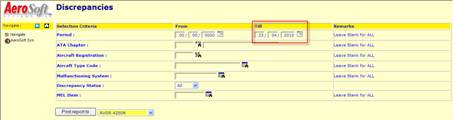
It was requested to default the Ed Date on the
Discrepancy Report to Today’s Date instead of the inacceptable date
“31/12/9999”. This is now provided for.
|
|
Elog #11895 |
Discrepancies |
Create JCN Tasks looses Aircraft Registration |
It was reported that the Aircraft Registration
“disappears” from the screen, when the screen refreshes when trying to assign
a Discrepancy to the JCN# 000000000000. This is now corrected. The system will warn the user
when he selects JCN#00000000000. |
|
Elog #12529 |
Discrepancies |
Add MEL Item not working |
It was reported that during the entry of MEL Items,
the system reported the entered MEL Item is already listed but it’s not shown
in the overview. This is now corrected by adapting the “save” button
logic. |
|
Elog #12558 |
Discrepancies |
Incorrect Year value on Discrepancy Report selection |
The incorrect year “9999” needs to be manually
corrected on the Discrepancy Report. This is now corrected as we will default to Today’s
Date. |
|
|
|
|
|
|
Elog #11578 #12582 |
Flight Logs |
Associated Aircraft Type Code not stored in Table |
We discovered that the Aircraft Type Code is not
stored in the Flight Log table. This is now corrected. |
|
Elog #11892 |
Flight Logs |
Distance between Airports on Flight Logs should be
calculated in Nautical Miles |
It was reported that the difference between Airports
should be shown/calculated in Nautical miles and not Kilometers. This is now corrected. |
|
Elog #12544 |
Flight Logs |
Capture of Night Flights in Flight Log Module |
We discovered that overnight flights could be entered
correctly. This is now corrected. |
|
Elog #12557 |
Flight Logs |
Blanks in Add Flight Log – Flight Crew Fields |
It was reported that sometimes the data elements of
the Flight Crew would show spaces instead on zeros during the entry of a
Flight Log. This is now corrected. |
|
Elog #12585 |
Flight Logs |
Flight Logs Report holds “KMS” in header |
It was reported that the Header of the Flight Log
Report holds “KMS” instead of “NM” (Nautical Miles). This is now corrected. |
|
|
|
|
|
|
Elog #F435 |
General |
Include License Seat Limitations per User |
For a new customer we included a logic to restrict
the number of logged in users per the license agreement. |
|
Elog #12376 |
General |
Discovered several codes using pic zz and pic 9999
for date fields |
Several screens are showing a date as “ 1/ 1/2010”
instead of “01/01/2010”. This is now corrected. |
|
Elog #12463 |
General |
Internet Explorer 8 |
It was reported that with Internet Explorer 8, the
login for DigiMAINT failed and following error was shown: “File error 10 on .dat COBOL error at 000241 in asixx000.acu” What is happening is that ‘however’ the link was
created, it is not to the correct starting point. The end result is that error recovery is
trying to fill the frames (not the login field in the title frame). The way to create a desktop shortcut is to drag the
icon beside the address to the desktop and all is OK with IE 8 before you
login to DigiMAINT. If you create the shortcut AFTER you have logged in,
you will get the error message as shown. |
|
Elog #12511 |
General |
Issues with reports |
We corrected a few minor issues with the format of
the header section in a few reports: Asifl500: Asiim538: Asim564: Asim565: |
|
Elog #12513 |
General |
Incorrect Date Format in various Tables |
We discovered some issues where the incorrect date
format “ 1/1 /2010” was stored in the tables. This is now corrected. The Day and Month field will
automatically correct the entry to leading zeros. |
|
Elog #12517 |
General |
Acceptance on Login takes a long time |
It was reported that the acceptance of the user ID
and Password can take a long time. This is now corrected. |
|
Elog #12553 |
General |
Incorrect number of rows |
We corrected several listings where the number of
rows displayed did not match the setting within the dmcblconfi-file. |
|
|
|
|
|
|
Elog #12512 |
Inventory Management |
problems with CSIFIM12 IMROTABLE |
It was reported that certain records from the
Rotable Inventory Tables could not be read/imported into another Database via
the AcuODBC Gateway. This is now corrected by a split of the Rotable
record in a separate Table that will contain the Component Life Limit and TBO
Limits against the Aircraft/Assembly Type it was last removed from. -
The Table CSIFIM12 will hold the
initial Rotable Data. -
The Table CSIFIM18 will hold the
TBO and Life limits for the Rotable after removal. |
|
Elog #12515 |
Inventory Management |
Receipt of Non Approved Part Numbers |
Following behavior was reported: A new Part Number is introduced into the GPI via a
Requisition. This PN will be listed within the List “New parts” until the
part details have been accepted. During several events, the user raising the
requisition provided wrong details, such as Part Type. If the New Part Number is not
corrected/adjusted/approved, the Requisition can still be processed, an order
created and parts received. If the part type is incorrect AND parts have been
received, a correction of the received materials and GPI Part number is not
very user-friendly. This is now corrected: -
non-approved Part Numbers can
not be placed on an order (via create req-order and via new order) unless the
Order is rated “AOG” (propriety “1” or “A”), -
non-approved part Numbers can
not be received via order and no-order receipt. |
|
Elgo #12599 |
Inventory Management |
Audit Trail does not store Consumable Lot Number
upon Rolling Stock Take |
It was reported that the Consumable Lot Number is
not stored in the Audit Trail (SAA-SN) upon Consumable Rolling Stock Take. This is now corrected. |
|
|
|
|
|
|
Elog #10665 |
Job Control |
Transfer of JCN Date to new Discrepancy |
During a change of a JCN Transaction/Task a new
Discrepancy can be created but the Discrepancy Input screen does not hold
preferential data related to the Job. This is now corrected. Preferential data from the
JCN Transaction is posted in the Discrepancy Input Screen. |
|
Elog #12178 |
Job Control |
Delete JCN Transactions - Consumables |
Issued Consumables have to be returned to Inventory
via the Stores Transaction - Return to Inventory" logic. This
functionality will also correct the corresponding JCN Transaction. A separate
"Delete Task" within the JCN Transactions could delete the JCN
Transaction without correcting the corresponding Stores Transactions. The “Delete JCN Task” Option no longer available. |
|
Elog #12317 |
Job Control |
Mismatch between Stores Transactions and Job Control
Transactions |
Although advised not to delete JCN Transactions on
issued Rotables to Client Aircraft (Aircraft not tracked in Aircraft
Inventory), some users actually deleted these JCN Transactions. The
associated Stores Transaction would not be deleted/modified as the issued
rotable would no longer be listed in Inventory. This is now corrected. -
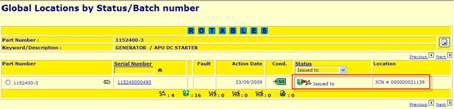
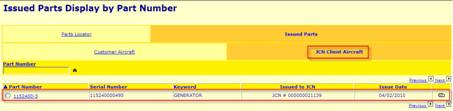
Rotables that are issued to
“Client Rego” will remain listed as “Issued to JCN” -
These Rotables remain listed in
the “Issued Parts” overview underneath the Tab “JCN Client Aircraft”. -
These Rotables can be “returned
to Inventory” when necessary. -
These Rotables will be removed
from the database when the associated Job is closed. |
|
Elog #12514 |
Job Control |
Change JCN Transaction for Defect looses details |
It was reported that after the initial conversion to
Release 3.70, the JCN Transaction on Defects would not show all Defect
Details. This is now corrected. |
|
Elog #12521 |
Job Control |
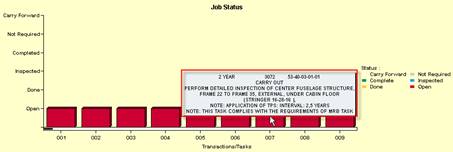
No text in move-over area |
It was reported that when the mouse/cursor is
positioned on the bar of a JCN Transactions, there is NO text displayed.
Another bar might show correct Task details. This is now corrected; additionally we provide more
details on the nature of the JCN Task.
|
|
Elog #12522 |
Job Control |
Missing Details on JCN Client Rego in JCN
Transaction Header |
The JCN Transaction Header for a JCN assigned to a
Client Aircraft would not show Aircraft Type and Aircraft Serial Number. This is now corrected. |
|
Elog #12549 |
Job Control |
Processing of Part On Only/Part Off Only not working |
We discovered that the JCN Part ON/OFF information
would not be handles correctly when the JCN Task refers to a Part
Installation or Part Removal only. This is now corrected. |
|
Elog #12550 |
Job Control |
SB/AD of JCN Transaction does not show correct
Serial Number |
We discovered that JCN Transaction is not showing
the correct SN on an SB/AD entry. This is now corrected. |
|
Elog 12551 |
Job Control |
Bill of Material - alignment of fields |
We have aligned the fields on the JCN Bill of
Materials. |
|
Elog #12610 |
Job Control |
Incorrect Discrepancy Template called |
We have made the change to call the correct
Discrepancy Template from Production Control. |
|
|
|
|
|
|
Elog #12533 |
Management |
Error when calling "Part Movement" via
"Management Analysis" |
An error was shown when the option “Part Movement”
was called via the “Management Analysis” module. This is now corrected. |
|
Elog #12546 |
Management |
Aircraft Usage Graph does not include all flights |
We discovered that under certain conditions the
graph “Aicraft Usage” would not include the first flight of a selected
period. This is now corrected. |
|
Elog #12557 |
Management - Reliability |
Error on "Unscheduled Removals report" |
An error was shown when the option “Unscheduled
Removals report” was called via the “Reliability Management” module. This is now corrected. |
|
Elog #12586 |
Management |
Incomplete data in column “Batch/Receipt(YMD)” |
The column “Batch/Receipt(YMD)” of the Inventory
Files would not hold the full date. This is now corrected. |
|
Elog #12587 |
Management - Reliability |
Incorrect Value of Total/Average Hours Shown |
We discovered that the “Rotable Failure Summary” did
not show the correct Numbers for Total Hours and Average Hours. This is now corrected. |
|
|
|
|
|
|
Elog
#11643 |
Master Catalogue |
AD Threshold and TBI Times applied incorrectly |
We discovered that under certain circumstances
during applying a new SB/AD to the GPI and applying to Aircraft, the
combination of Threshold and TBI Details are applied to the Aircraft
Inventory Records. This is now corrected. |
|
Elog #12545 |
Master Catalogue |
Change Chapter 05 Inspection does not include Rego
and Total Times |
We discovered that "change Chapter 05" would
show the correct Aircraft Reg. and Total Times, when the user has NOT visited
Aircraft Inventory first but uses the Global Search in GPI to change the
data. This is now corrected. |
|
Elog #12568 |
Master Catalogue |
Missing GPISB-CATEGORY = "HIGH.RECOM". |
We discovered that the option “HIGH.RECOM” (Highly
Recommended) is not
available is a particular screen. This is now corrected. |
|
Elog
#12581 |
Master Catalogue |
it no longer possible to add 3 digits in the “Total
Number of Inspections in Phase" field |
It was reported that the field “Total Number of
Inspections in Phase” would only accept 2 digits. This is now corrected; the fields will accept 3
digits. |
|
Elog
#12603 |
Master Catalogue |
No Planning Info (Material, Tooling, Access Panels)
for Components |
It was discovered that it is not possible to apply
Planning Info; Materials, Tooling and Access Panels, to Rotable Records. This is now corrected. |
|
Elog
#12607 |
Master Catalogue |
Aircraft type codes cannot be added, changed,
deleted in partlocator for rotable parts |
It was reported that after incorporation of
Elog#12603, the Menu Options “Add, Change and Delete” were not accessible. This is now corrected. |
|
|
|
|
|
|
Elog #F477 |
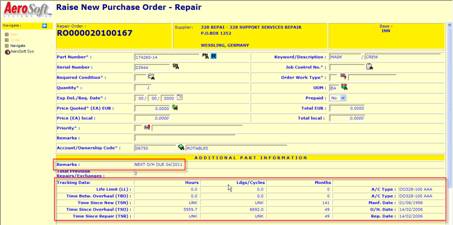
Orders/Purchasing |
Show Rotable Limits and Time remaining during Create
Repair Order |
It was requested to show the Rotable Limits when a
Repair Order is created. This will help preventing sending Units for Repair
with little time left for Overhaul. Information shown includes: -
Removal Remarks, -
Time Since New, -
Time Since Overhaul, -
Time Since Repair, -
Life Limits and applicable
Aircraft Type, and -
TBO Limits and applicable
Aircraft Type.
|
|
Elog #12509 |
Orders/Purchasing |
No future Date on Dispatch Note allowed. |
It was reported that a Dispatch Note could not
contain a Future Date. Therefore it would not be possible to prepare a
Dispatch Note for next day delivery. This is now corrected |
|
Elog #12510 |
Orders/Purchasing |
Create Order with FireFox not working |
It was reported that the “Create Order”
functionality does not work correctly when using FireFox Web Browser. This is now corrected. |
|
Elog #12574 |
Orders/Purchasing |
Time Since Repair on History Card set to
"UNK" |
It was reported that DigiMAINT would set the Time
Since Repair to “UNK” on the History Card during “create Repair”. This is now corrected. A fix program has been included to correct any
issues. |
|
Elog #12589 |
Orders/Purchasing |
Part Condition on Order "lost" after
refresh due to missing JCN |
We discovered that the Part Condition on the Order
is reset after a refresh due to a missing JCN. This is now corrected. |
|
Elog #12652 |
Orders/Purchasing |
Replacement cost validation |
We corrected an issue on a customization for a
particular customer. |
|
Elog #12605 |
Orders/Purchasing |
Wrong replacement cost displayed on order |
We corrected an issue on a customization for a
particular customer. |
|
|
|
|
|
|
Elog #F434 |
Part Locator (GPI) |
Control user access based on Part Type and
Account/Ownership Code |
It was requested to control user access based on
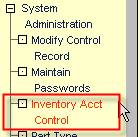
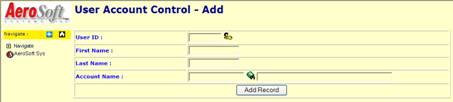
Part Type and Account/Ownership Code. This is now included. -
The System Administrator can use
the menu options “System Administrator > Inventory Acct Control” or the
associated icon -
Using the “File – Add/Change” he
can associate Users and Account/Ownership Codes. -
If the user has not associated
with any Account/Ownership Codes, he will have access to all
Account/Ownership Codes. -
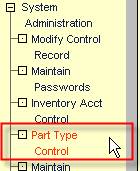
The System Administrator can use
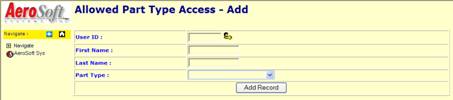
the menu options “System Administrator > Part Type Control” or the
associated icon -
Using the “File – Add/Change” he
can associate Users and Part Types. -
If the user has not associated
with any Part Type, he will have access to all Part Types. |
|
Elog #F437 |
Part Locator (GPI) |
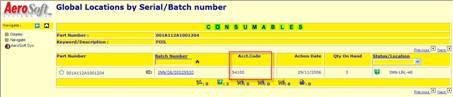
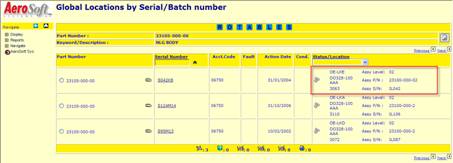
Show Account/Ownership Code on GPI Global Locations |
It was requested to Show Account/Ownership Code on
GPI Global Locations. This is now included.
|
|
Elog #F478 |
Part Locator (GPI) |
Prevent Material Issue with Issue Date < JCN
Scheduled Date |
It was requested to prevent material issue with a
back-dated issue date that is before the JCN Scheduled Date. This is now included. |
|
Elog
#12375 |
Part Locator (GPI) |
Unit received in Serviceable Condition shows
Unserviceable Condition |
It was reported that a Unit received in Serviceable
Condition would show “Unserviceable”. The information in the History Card did
show a change of Condition. The system will automatically validate and change
the condition of a Rotable once the Shelf life Limit has expired. We have now adjusted this functionality to generate
appropriate log/audit entries. |
|
Elog #12490 |
Part Locator (GPI) |
Digimaint > Record currently in use |
It was reported that the system would show a “Record
Currently In Use” warning, when a user tried to issue the remaining units of
a batch that was previously partly issued immediately after Receipts. This is now corrected |
|
Elog #12502 |
Part Locator (GPI) |
Rotables
Records with missing Generic Record |
A mismatch between records in the Rotable Inventory
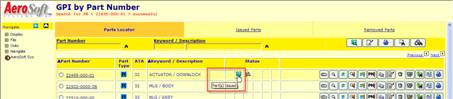
Table and the Generic table was reported. This is now corrected. Upon removal of the Issued
Rotables to a Client Aircraft, entries in both Tables will be removed. Additionally, we display new Icons in the Parts
Locator to indicate: -
-
|
|
Elog #12524 |
Part Locator (GPI) |
Digimaint - Stores Transactions - Return to stores
(Rotable) |
It was suggested to provide a “Return to Inventory”
functionality for Rotables Issued to Client Aircraft. In reference to Elog#12317 this is now provided for. |
|
Elog #12593 |
Parts Locator (GPI) |
GPI Incorrect replacement cost overview not complete |
We corrected an issue for a customization at a
particular customer. |
|
Elog
#12569 |
Parts Locator (GPI) |
Search/Sort on Serial Number not working |
It was reported that the search/sort on Serial
Number is not
working on the Global Locations for Rotables. This is now corrected; additionally, we provide more
details when a unit is fitted to an Assembly or Sub-Assembly.
|
|
Elog
#12583 |
Parts Locator (GPI) |
Unit set to "UNSV" although Shelf Life
Expiry Date not expired |
It was reported that a Unit is set to
"UNSV" although the Shelf Life Expiry Date is still valid. It only
happens when the Unit is "SERV". This now corrected; the system will no longer
validate against the Shelf Life Period but will use the Shelf Life Expiry
Date. |
|
Elog
#12594 |
Parts Locator (GPI) |
Print Serviceable Tag available although Control
Switch indicates rotable Only |
It was reported that the menu-option "Print
> Serviceable Tag" is available for Consumables although the Control
Switch is set to "Rotables Only". This is now corrected. |
|
Elog
#12595 |
Parts Locator (GPI) |
Change of Rotable Condition due to Shelf Life not
recorded in Audit Trail |
Rotables with Expired Shelf life Dates will be set
to "UNSV" automatically when the Shelf Life Date has expired. This
change is NOT recorded in the Audit Trail and History Card. This is now corrected; appropriate audit/log entries
are made. |
|
Elog
#12598 |
Parts Locator (GPI) |
Problems with GPI Global Locations _ Rotables |
Following issues were reported with “Global
Locations – Rotables”: -
Next/previous not working, the
list always restarts at the first record and will NOT show the next XX
records. -
Search/Sort by Serial Number not
working. This is now corrected. |
|
Elog
#12600 |
Parts Locator (GPI) |
PN/SN Change does not include old SN in History Card |
When a PN/SN is changedthe History Card will hold 2
entries: - PN Changed Frm:XXXXXXXX - SN Changed Frm:XXXXXXXX But in both records, the XXXXXXXXX holds the Old-PN
value. The Old-SN is not recorded. This is now corrected. |
|
|
|
|
|
|
Elog #12496 |
Production Control |
Digimaint > Delete TRN on JCN |
In reference to Elog#12317, it is no longer possible
to delete a JCN Transaction. With elog 12502 we included the envisioned logic: -
Ensure that Rotables issued to
client Aircraft are not removed from CSIFIM12 but remain listed as
"Issued". -
Issued Rotables can be
"returned to inventory" and the associated FJC13/FIM13 Transaction
will be removed. -
Remove the FIM12 Issued Rotables
as soon as the associated JCN Transaction is “closed” or the JCN is closed |
|
|
|
|
|
|
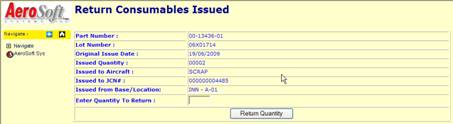
Elog #F34 |
Receipts |
Return Consumable to Stores |
It was requested to show more details on the issued
batch during the “Return to Inventory” process. This is now included. The screen includes: -
Part Number, -
-
Original Issue Date, -
Issued Qty, -
Issued to Aircraft, -
Issued to JCN#, and -
Issued from Base/Location.
|
|
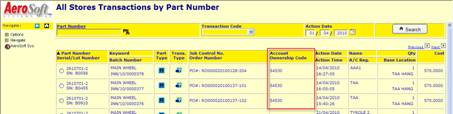
Elog #F454 |
Receipts |
Include Account Ownership Code in Stores Transaction
Display |
It was requested to include the Account/Ownership
Code in Stores Transactions. This is now included.
|
|
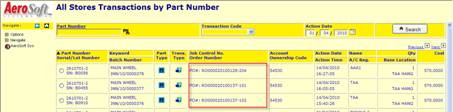
Elog #F468 |
Receipts |
Include |
It was requested to include the PO Order Number and
Item Number in Stores Transactions. This is now included.
|
|
Elog #F480 |
Receipts |
Include switch in rolling Stock Take to exclude
12Month limit |
It was requested to modify the Rolling Stock Take
function to exclude the 12 Month Limit un demand (switch) to allow ad-hoc
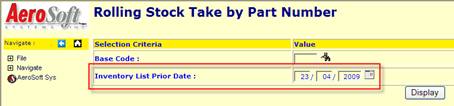
Stock Take Corrections. This is now included. Upon selecting the Rolling Stock Take Functionality,
you can enter/select the data prior to which all items not counted for will
be selected. Set it to Today’s date to have all Stock Items
listed.
|
|
Elog #12516 |
Receipts |
Incorrect BN used on AUDIT-TRAIL-EXCHANGE |
We discovered that during the receipt of an Exchange
Unit, the Core Unit return entry was collecting the Batch Number of the
received Unit. This is now corrected |
|
Elog #12525 |
Receipts |
Invoices Processing is “terminated” upon selection
of Invoice Currency |
It was reported that the Invoice Process would be
terminated upon the entry/selection of Invoice Currency when the Invoice was
called from the “All receipts” Tab. This is now corrected |
|
Elog #12530 |
Receipts |
Batch received and issued at the same time |
When a Batch shows “Receipt” and “Issue” at the same
time (HH:MM:SS) it indicates the receipt of a Sundry Order. |
|
Elog #12531 |
Receipts |
Receiving Consumables on No Order - Replacement Cost
warning |
It was reported that the system would warn the user
incorrectly upon a no Order receipt of consumables in respect to the GPI
replacement Cost. This is now corrected |
|
Elog #12613 |
Receipts |
Serial Number entered with '-character |
We discovered that certain screens and fields will
not show correct details when the Serial Number includes a special character
(“, ‘, \, <, or >). This is now corrected and the system will warn the
user if a special character is included. |
|
|
|
|
|
|
Elog #12303 |
Reports |
aging of inventory (consumable items) |
It was reported that the report “Aging of Inventory
(Consumables) is not working correctly. This issue could not be confirmed. |
|
Elog #12504 |
Reports |
File error on Aging Inventory Report |
Running the Aging Inventory Report showed an Error
Message. This is now corrected |
|
Elog #12506 |
Reports |
Error message on Report Aging of Inventory by
(Accounts) |
Running the Aging Inventory by Accounts Report
showed an Error Message. This is now corrected |
|
|
|
|
|
|
Elog #12534 |
Requisitions |
Set Requisition to "Closed" will not
remove FSA02 record |
We discovered that the generic record is not removed
when the associated requisition item status is changed to "closed". This is now corrected; additionally, a “re-open”
will re-create a generic record. |
|
Elog #12539 |
Requisitions |
Shows all requisition tabs on all requisitions lists |
It was reported that the tabs on requisitions are
not showing all options (open - unprocessed - on hold - closed) on all lists. This is now corrected. |
|
Elog #12540 |
Requisitions |
Incorrect Menu privileges on Requisitions |
It was reported that a user with Access level
"View Only" on Requisition (Material Management) has incorrect
access privileges. This is now corrected. |
|
Elog #12541 |
Requisitions |
View Requisition does not show Status |
We discovered that the Requisition Status is not
shown when the user views the requisition via GPI. This is now corrected. |
|
Elog #12542 |
Requisitions |
Re-opening a Closed Requisition will always set
status to "On RFQ" |
We discovered that when a Closed Requisition is
Re-Opened, it will default the status ´to "On RFQ", even when NO
Vendors has been applied to the Requisition. This is now corrected. |
|
|
|
|
|
|
Elog #00701 |
System Administration |
Change Account/Ownership Codes, Base Codes, … |
It was suggested to provide a functionality that
will allow the change of Account/Ownership Codes through out the data-files
of DigiMAINT. This is now provided for: -
Account/Ownership Codes, and -
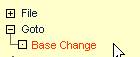
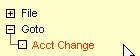
Base Codes. Use the Menu Options “Goto > xxxx Change”
|
|
Elog #12565 |
System Administration |
No authority on "Maintain Printers" |
After applying an interim upgrade patch, the menu
option "system administrator > maintain printers" is no longer
available for a user with system administrator access privilege. This is now corrected. |